
Public and Media Access to Court Proceedings and Records
Effective Date: August 19, 2026
This pdf has page numbers and a table of contents. Use this instead of the "save section as pdf" button on this page if you require those elements. NOTE: If there is any difference between this document and the information on the website, the website version should be relied on.
Contents
Save section as PDF
This policy applies to the Provincial Court of British Columbia proceedings and court records.
Courts are open to the public
This openness is a key part of a democratic society. When people can see how courts work, it helps build trust in the legal system and helps people understand how justice is carried out. While most court hearings are open to the public, there are exceptions where legislation requires, or a judge may order, that a proceeding be held in a closed courtroom.
Important role of media
The open court principle ensures that media have the right to attend court and report on what happens there. This helps the public stay informed even if they do not attend court themselves.
Court hearings may happen in person in a courthouse, but they can also happen remotely (virtually)
For example, participants(1) attend remotely by telephone or video for a lot of hearings that occur before a trial. Whereas, most of the time people go in person to a courthouse for their trial.
Access to court records is an important part of courts being open to the public
Many court records are open to the public and the media. But in some cases access is limited or not allowed based on the need to protect important social values. For example, there are legislative restrictions on access to documents involving youth in family and criminal proceedings.
The Court has supervisory power to oversee and protect court records
The Court sets policy about accessing court records to make sure that access is consistent with applicable laws and takes into consideration the various rights and interests involved.
The role of Court Services Branch of the Ministry of Attorney General in terms of access
Court Services Branch makes sure this policy and any directions from the Court about accessing court records are followed. Registry staff at courthouses handle the day-to-day work of managing these records and access requests, in addition to carrying out other court operations. People should be able to obtain court records without significant delay from the court registry. However, the time to provide access may be impacted by other court operations, and whether the records are stored off-site.
The Court has established this policy about general access
This policy sets out information about general access to court proceedings, court records, and related information. This policy does not affect the ability of a judge(2) to make decisions or orders in a specific matter. Judges can make decisions about access issues in individual cases where the right to access is balanced against other important rights or social values. If there is a court direction or order about access in a specific case, that direction will apply to that case. This policy also does not limit the court’s ability to address safety and security issues.
Application Forms
If you need to make an application to access a court record, court forms can be found here:
Criminal adult: Application to a Judge (PCR315)
Criminal youth: Application to a Youth Justice Court Judge (YTH080)
- Family: Application for Case Management Order With Notice (PFA717)
Adult Guardianship: Application for Other Orders (PFA844)
Child Protection (CFCSA): Application for an Order (PFA895)
Child Protection (Laws of the Cowichan People for Families and Children): Application Respecting Orders (PFA933)
Small Claims: Application to a Judge or Justice (SCL017)
Traffic: Application to a Judge (PCR315)
Requests for bulk or special access to court information
Requests for bulk or special access to court records for research or other purposes (such as supporting the proper administration of justice) can be made through the Judicial Access Policy Working Committee (APWC). For further information and the application form, please contact APWC_Application@gov.bc.ca. Final decisions on applications are made by the judiciary and communicated to the applicant through the APWC. Bulk or special access applications should not be made for access to court records or court record information ordinarily available at a court registry, through Court Services Online, or through another court record access system.
The Freedom of Information and Protection of Privacy Act (FIPPA) does not apply to court records
FIPPA addresses access to records in the custody or under the control of a public body. However, section 3(3) states that FIPPA does not apply to a court record or certain other records listed in that section, and Schedule 1 of FIPPA specifically excludes the Provincial Court from the definition of a public body. This means that Provincial Court records are not accessed through FIPPA’s processes.
Freedom of Information and Protection of Privacy Act
***
Notes:
(1) “Participants” is generally used in this policy to refer to those involved in the proceedings, including the judge, parties, counsel and witnesses. In the section “Rules for remote listening or participation” “participants” refers to parties, counsel and witnesses.
(2) To make things easier, this policy uses the word “judge” to refer to both judges and judicial justices. Judicial justices decide search warrant applications, and conduct bail hearings, traffic, ticket and bylaw trials and small claims payment hearings.
The public areas of courthouses are open to everyone during normal hours of operation. Most courthouses are open 9:00 am to 4:30 pm. Most courthouse registries are open 9:00 am to 4:00 pm.
In some court locations, cases are not scheduled every day and there may not be court staff present unless cases are scheduled. You can look up individual court locations for more information.
Page contents
1. Public access to in-person hearings
a. Process to ask if you can listen to an in-person hearing remotely
b. Courtroom sketching
2. Public access to remote (virtual) hearings
a. Remote bail and sentencing hearings
b. Other remote hearings
3. Public access to hybrid hearings
4. Rules for remote listening or participation
a. Members of the public
b. Participants
Purpose
The purpose of this section is to set out the circumstances and procedures for members of the public and media to listen to, or request to listen to, court proceedings.
The vast majority of hearings are open to the public. To find out what matters are being heard there are daily court lists for adult criminal and small claims hearings posted on Court Services Online, as well as being posted in the applicable courthouse. These court lists include the names of the cases, the courtroom, the date of the hearing and the time the hearing starts.
In some circumstances judges may, or must, order that proceedings be heard in a closed courtroom without the public. For example, given the private and confidential nature of case conferences, only the judge, parties and their lawyers attend, unless otherwise permitted by the judge. Case conferences include, for example, small claims settlement conferences, small claims trial conferences and family case conferences.
Court proceedings may be held:
- In-person: participants such as judges, lawyers, parties, and witnesses are physically present in a courthouse – most trials are in-person
- Remotely: participants attend the hearing virtually by audioconference (usually by telephone or MS Teams) or videoconference (usually by MS Teams) – case conferences and proceedings before a trial are usually held remotely
- Hybrid: some participants attend the hearing remotely and some attend in-person
Hearing participants will be provided with a document telling them the date, time and location of their hearing. If they are attending remotely and have provided their email to the registry, they will receive the meeting link or dial up information to join the hearing remotely. If they have not provided an email address to the registry, they must contact the registry to obtain this information.
- Family: Notice of Address Change (Form 46)
- Child Protection (CFCSA): Notice of address for service (Form 8, PFA 900)
- Child Protection (Laws of the Cowichan People for Families and Children): Notice of address for service (Form 8, PFA 939)
- Small Claims: Address for Service (Form 38)
- Violation Ticket: Violation ticket change of address (PTR805)
All courthouses have an accessibility coordinator that participants and the public can ask about special assistance.
If a hearing participant needs an interpreter there is information about these services on our website.
If permitted to attend remotely, participants and members of the public must not forward or share the meeting link or dial up information with anyone not authorized to have that information. There may be consequences for doing so, including cancelling the right to participate or listen remotely.
1. Public access to in-person hearings
If all participants are attending at a courthouse in person, members of the public can attend in-person at the courthouse in most cases.
If you are watching a court proceeding in person, be aware that the judge and those participating in court proceedings need to hear everything that is said. People entering or exiting a courtroom or watching court must not do anything that could interrupt proceedings. For example, close the courtroom door quietly, stay silent while in the courtroom, turn off your phone (or turn your phone to silent mode) and avoid speaking loudly in the hallways near courtrooms.
A judge may sometimes order that no one enters or leaves the courtroom to protect the process. This might occur during the testimony of a particular witness, during an address by a litigant or a lawyer to the Court, or when the Court is giving a decision about a matter. If such an order is made, the sheriff on duty will enforce it.
No members of the public watching a proceeding are permitted beyond the Bar in a courtroom unless the judge gives express permission. The Bar is usually a railing or half wall that separates the public seating area in a courtroom from the area where those involved in a hearing are participating.
Members of the public need to apply in advance of an in-person hearing to ask for permission from a judge to listen to the court proceeding remotely (by telephone or MS Teams audioconference).
a. Process to ask if you can listen to an in-person hearing remotely
Email the applicable court registry as far in advance of the hearing as possible and provide a completed “Request to Listen To Hearing Remotely” form which has the following information about the proceeding:
Case name
Case number (if known)
Hearing date
Indicate if you are a witness in the proceeding and, if yes, provide your name
Indicate the reason you are not able to attend in person
If you send your request on short notice, the court may not have time to consider your request, or the registry may not have time to send you the information.
Court registry contact information
Request to Listen to Hearing Remotely form
A judge will decide whether you can listen by telephone or MS Teams audioconference. That decision will apply unless a different judge presiding at the hearing directs otherwise.
The judge may consider whether allowing you to listen remotely (by telephone or MS Teams audioconference) makes the hearing more accessible. They may also consider whether it could:
Disrupt the court proceedings
Create resource issues such as availability and set up of a virtual hearing
Interfere with the administration of justice (for example, if someone may secretly record and share the audio of the hearing, which is against this policy).
If the judge allows your application, they may impose conditions, and include reminders, that you:
Follow the court’s Access Policy and do not record the hearing, and do not post, share or disseminate the audio from the hearing
Do not violate any publication bans
Do not share the link or access details with others
Use a screen name that correctly identifies your name (this helps court staff manage the virtual waiting room)
Only have audio access to listen to the hearing, not video access to watch the hearing
Do not interrupt or cause a disruption
Join on time
An individual who fails to comply with any conditions that they are subject to may be removed from the virtual hearing and may be subject to sanctions.
b. Courtroom sketching
If you would like to engage in courtroom sketching, contact the court registry in advance with the specific date, time and courtroom you want to attend. It is important to do this in advance as you must have the judge’s approval to sketch in the courtroom, and follow any conditions the judge sets. Conditions may include:
Not drawing members of the public watching the case
Not publishing, including posting, sketches if there is a publication ban
Not sketching courtroom features like doors or locks
Following any directions from the sheriffs
Liquid materials like paint are not permitted to be used in a courtroom. Failure to obtain prior approval may result in the judge denying permission to sketch.
For information about photographing and recording court proceedings see Phones and electronic devices in courtrooms.
2. Public access to remote (virtual) hearings
There may be a limit on the number of people that can be connected by telephone to a remote hearing.
Generally, if members of the public are permitted to attend a remote hearing it is by listening to the proceedings by MS Teams audioconference or telephone, not watching them by videoconference.
a. Remote bail and sentencing hearings
Many judicial interim release (bail) hearings, and some criminal disposition (sentencing) hearings, are done by judges, lawyers and the accused attending remotely in a virtual courtroom.
CRIM 05 Hearing of Bail Applications sets out directions for hearing bail applications in court and at the Justice Centre.
Members of the public wishing to hear a remote bail or sentencing hearing must email the court registry where the file originates as far in advance as possible before the hearing and provide the following information about the matter they would like to hear:
case name
case number (if known)
hearing date
The court registry will provide instructions on how to join and listen to the remote hearing.
CRIM 05 Hearing of Bail Applications
Court registry contact information
If you send your request on short notice, the registry may not have time to send you the information.
b. Other remote hearings
For remote hearings other than remote bail and sentencing hearings, members of the public need the permission of a judge in advance of the hearing to listen to the court proceeding remotely. The process to make that request is set out in section 1 on this page under "Public access to in-person hearings".
3. Public access to hybrid hearings
For hybrid hearings, members of the public can attend in-person in most cases.
Members of the public need to apply in advance of the hearing to obtain the permission of a judge to listen to the court proceeding remotely (by telephone or MS Teams audioconference). The process to make that request is set out in section 1 on this page under "Public access to in-person hearings".
4. Rules for remote listening or participation
When participating in a court proceeding or listening to a court proceeding remotely, the same respectful behaviour is expected as if physically in a courtroom.
a. Members of the public
Members of the public will only be connected at the set start time. If disconnected, the court will not disrupt the proceeding to re-connect them.
They must:
not do anything that could interrupt or distract from the proceedings
be silent (mute their microphone)
b. Participants
Participants must comply with the following:
- Dress appropriately: If appearing by video lawyers are expected to wear business attire. Parties, witnesses, and other court participants should generally dress in clothing that is appropriate for an office workplace or a job interview.
- Arrive early: You should be prepared to join the court proceeding at least 15 minutes before it is scheduled to start to allow time to address any technical issues. Before the proceeding starts, you will enter a virtual waiting room and remain there until the proceeding begins.
- Standing and bowing: You do not need to bow or stand when remote court proceedings start or end. You can remain seated when speaking to the judge.
- Lawyers’ remote appearances are by videoconference: If you are a lawyer participating in court proceedings remotely using MS Teams, you must appear by videoconference or apply to the Court to appear by audioconference only.(1)
- Location: Lawyers must appear from a quiet, private space. Parties, witnesses, and other court participants must make reasonable efforts to appear from a quiet, private space.
- Videoconference backgrounds: Lawyers must have a neutral background. Parties, witnesses, and other court participants must make reasonable efforts to have a neutral background. Neutral backgrounds can be especially important when there are security concerns for a party or a witness. Profiles or background images that do not reflect the dignity and serious nature of court proceedings must not be used.
- Use your name when prompted for a screen name: When you join a proceeding you will be asked to enter your name. Type your first and last name. The name that you enter will be displayed for all participants to see.
- Use of cameras: If you are appearing by video, you should have your camera off while waiting for your matter to be called. When dealing with your matter, you must have your camera on, even when not speaking, unless the judge directs otherwise. When speaking, look into the camera. If using a smartphone, turn your phone horizontally to landscape mode so more of your image displays.
- Audio connection: If using a telephone, a land line works better than a cell phone. Do not use the speaker phone function. Instead, use a hand-held phone or headphones with a built-in microphone and mute feature. If possible, avoid the use of Voice Over Internet Protocol (VOIP). Say your name before you speak. Otherwise, it is hard to know who is talking, especially on the audio recording of the proceeding.
- Mute microphone: Mute your microphone when you are not speaking to avoid background noise. Close any applications you do not need (like social media or email) and silence your phone to avoid interruptions.
Introductions: When introducing yourself or someone like a client or witness, say a title and name (e.g., Mr./Ms./Mx./Counsel Jones), and pronouns. GEN 01 explains how to introduce yourself or others in court.
- Speak clearly and do not speak over others: Speak clearly and slowly so everyone can follow what you are saying. Pause frequently to allow the judge to ask questions and avoid speaking over the judge or other participants. This is particularly important when there is an interpreter. Mute the microphone again when finished speaking. Follow the judge’s directions about when to speak or ask questions.
- Objecting, responding or commenting: If you find it necessary to object to, respond to, or comment on something that an opposing party has said and it cannot wait:
- if on video, click on the raise hand button or raise your hand to signal to the judge that you wish to speak; and
- if on audio, respectfully interrupt the conversation when appropriate to let the judge know that you have something to say. - Time limits: There may be time limits set before or during the hearing. Follow them so everyone has a fair chance to speak. If you are on video, you might see an “End of Meeting” warning near the end. This means time is almost up, but only the judge decides when the hearing ends. Stay connected until the judge tells you to leave.
- Materials: Collect and organize the documents you will need in advance, and make sure you have them with you for the hearing. Avoid shuffling papers as that can be distracting and make it hard to hear others.
- No food, drink or smoking: Do not to eat or drink during remote court proceedings except water, and do not smoke or vape.
Technical issues: If the image or sound quality is interrupted, ask whether other participants can still see/hear you. If so, continue. If problems persist, ask the judge if you can turn off your video. If the session ends unexpectedly, try re-connecting. If the video platform is not working, the Court will contact you either to provide teleconference dial-in details or to reconnect you.
***
Notes
(1) You can make the application on the same day as the court appearance before the presiding judge and no materials need be filed in advance unless otherwise directed by the Court.
Page contents
1. Photography and recording
2. Computers
3. Wi-Fi
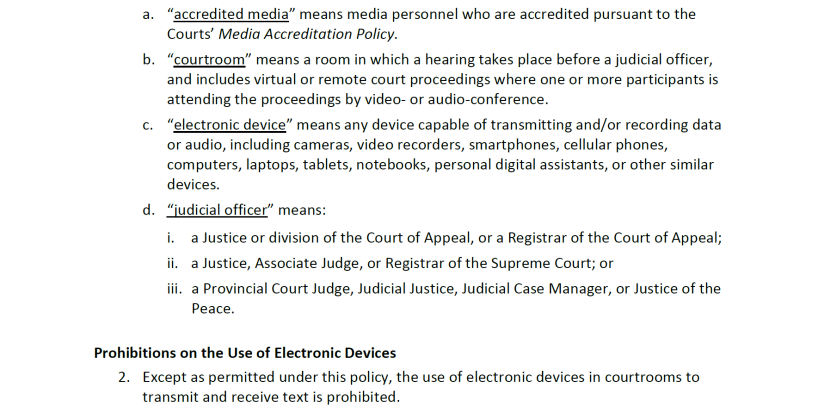
The Court of Appeal, the Supreme Court, and the Provincial Court of British Columbia have a joint policy called the Use of Electronic Devices in Courtrooms. While most of the information from that policy which applies in the Provincial Court is included in this section, it is important to read the full policy.
1. Photography and recording
Without the judge’s permission, the following are prohibited:
Audio recording (see exception under Accredited Media, section 2(d)), video recording, photographing, or taking screen shots of a court proceeding.
Publishing, broadcasting, reproducing, transmitting, sharing, making available, or otherwise disseminating recordings, photographs, video or screen shots of court proceedings.
Members of the public are not permitted to use cell phones in a court proceeding. Please turn off your cell phone. This is to ensure proceedings are not recorded, photographed, or subject to any actions prohibited by this policy.
Audio recording, video recording, photographing or filming in a courtroom when court is not in session. The only exceptions are:
If authorized in advance by the Chief Judge. The person making the request must submit a written request to the Chief Judge addressing how the request meets an educational need and/or is for court related information purposes.
During ceremonies where family members and friends may take photographs or video/audio record for their personal use, not for posting on social media, publication or broadcast.
Audio recording, video recording, photographing or filming judges’ chambers and sheriff cells. The only exception is if authorized in advance by the Chief Judge and for sheriff cells the BC Sheriff Service.
Audio recording, video recording, photographing or filming in court facilities is prohibited. The only exception is if authorized in advance by the Chief Judge.
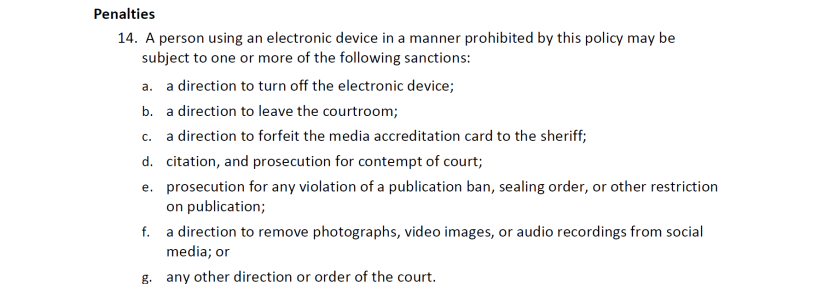
A person using an electronic device in a manner prohibited by this policy may be subject to one or more of the following sanctions:
a direction to turn off the electronic device;
a direction to leave the courtroom;
a direction to forfeit their media accreditation card to the sheriff;
citation, and prosecution for contempt of court;
prosecution for any violation of a publication ban, sealing order, or other restriction on publication;
a direction to remove photographs, video images, or audio recordings from social media; or
any other direction or order of the court.
They may also be subject to actions taken by the sheriffs under the Sheriff Act.
2. Computers
Unless the judge prohibits it, the following use of computers is permitted, as long as the use does not disturb the proceedings, interfere with the operation of the Court’s own electronic equipment, or otherwise conflict with the Use of Electronic Devices in Courtrooms Policy (Appendix C):
Anyone is permitted to use computers (other than cell phones) for the purpose of note-taking;
Counsel, and prosecutors in traffic and ticket matters, are also permitted to use computers for the purpose of accessing records and files directly related to the current proceedings; and
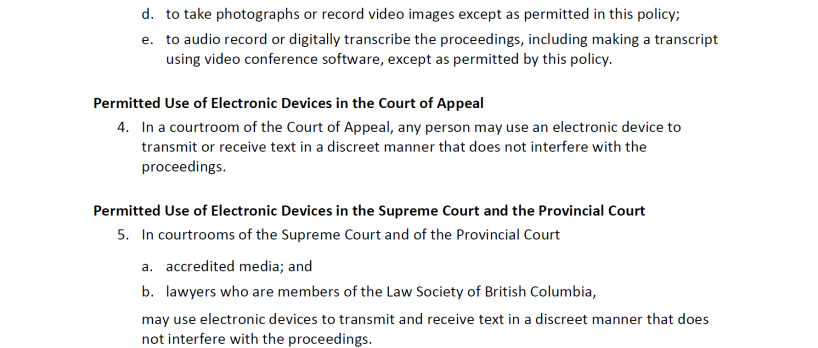
Only lawyers and accredited media are permitted to use electronic devices, like cell phones, to transmit and receive text. This must be done in a discreet manner that does not interfere with the proceedings, as set out in the Use of Electronic Devices in Courtrooms Policy (Appendix C).
3. Wi-Fi
Many courthouses have free Wi-Fi.
Page contents
1. All media (accredited and not accredited)
a. Viewing court hearing lists
b. Attending court proceedings
c. Asking to speak in a proceeding
d. Application to access a restricted document or exhibit
e. Application to record, broadcast or televise a proceeding
f. Requesting a comment
2. Accredited media
a. Accreditation process
b. In-person access
c. Remote access
d. Use of electronic devices (texting and recording proceedings)
e. Access to audio recording of proceedings (DARS)
f. Access to court records by secure file transfer service (SFTS)
1. All media (accredited and not accredited)
a. Viewing court hearing lists
Members of the media can view criminal and small claims Provincial Court hearing lists on Court Services Online. There are also hearing lists posted in courthouses.
b. Attending court proceedings
All members of the media may attend proceedings in person at a courthouse.
Members of the media who are not accredited may apply to listen to a remote proceeding by audioconference (usually by telephone or MS Teams audioconference).
For accredited media, information about remote access is below in section 2(c).
c. Asking to speak in a proceeding
If a member of the media wishes to make an application to the presiding judge to, for example, comment upon a discretionary publication ban application, if they are physically present they may stand up in the public seating area of the courtroom and ask the presiding judge to allow them to make an application related to the proceeding. If they are listening to a hearing remotely they can send a message to the court clerk asking to be heard.
d. Application to access a restricted document or exhibit
Media can apply to access a restricted document or exhibit.
Introduction: Link to Application Forms
e. Application to record, broadcast or televise a proceeding
Media seeking to video record, broadcast or televise a court proceeding must apply to do so well in advance of the court hearing. In support of the application, the applicant must submit a written argument addressing the impact of the authorization sought on:
fair trial rights
privacy interests
witnesses in the proceeding
the Court and the administration of justice
any other factors which the applicant considers relevant to the application
Introduction: Link to Application Forms
The judge considering the application may refer to the procedures and requirements in the BC Supreme Court’s Practice Direction Applications for Authorization to Video Record or Broadcast Court Proceedings (PD 48) and make an order or direction about whether any of those procedures or requirements apply.
f. Requesting a comment
Comment on a case: Judges speak through their orders and reasons for judgment. The Chief Judge and judges do not comment on specific cases that are or have been before the Court or may come before it in the future.
Statement about the court: Media can use the online form on the Court's media page to request a statement.
If you would like a statement by the Supreme Court or Government, go to their respective websites.
Media (information, resources, photos)
2. Accredited media
a. Accreditation process
Requests by media to become accredited with the Court of Appeal, the Supreme Court, and the Provincial Court of British Columbia can be made by contacting the Accreditation Committee referred to in the Media Accreditation Process administered by the Supreme Court and found on the Supreme Court’s website.
When in courthouses, media who have obtained accreditation are asked to keep their accredited media identification on them at all times and show it if requested by a sheriff or court official.
Accredited media with accredited media identification will have priority in areas designated for the media, unless circumstances relating to issues of safety and/or security do not allow for this.
Media with accreditation should give the sheriff or court clerk as much notice as possible if they plan to use audio recording devices in the courthouse. Information about the limitations on how accredited media can use recordings is set out below.
b. In-person access
Accredited media, like all media as noted above, may attend proceedings in person in a courthouse.
c. Remote access
Accredited media may listen remotely to proceedings that are in person, remote, or hybrid and are open to the public. Contact the applicable court registry in advance for information about how to listen to proceedings.
Court registry contact information
If you send your request on short notice, the registry may not have time to send you the information.
Listening remotely is subject to the following conditions:
Cellphones and devices must be on mute
If using a landline, accredited media must be in a quiet room, so they do not disrupt court
If accredited media do not call in at the set time or if the call is lost, the Court will not disrupt proceedings to connect them
There may be limits on the number of people that can be connected remotely
d. Use of electronic devices (texting and recording proceedings)
Accredited media may use electronic devices to transmit and receive text in a discreet manner that does not interfere with the proceedings.
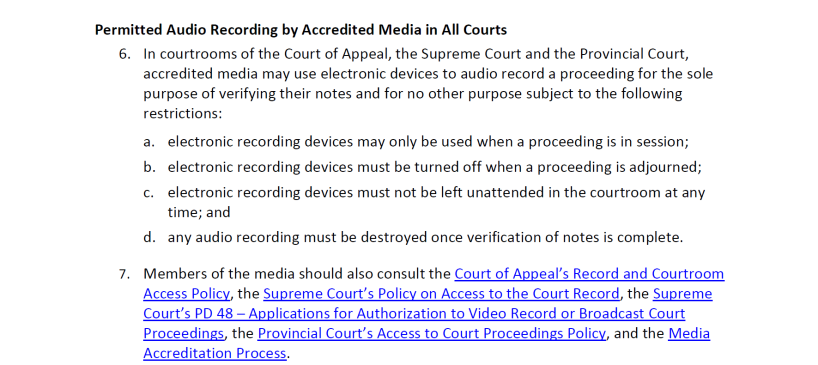
Accredited media may use electronic devices to audio record a proceeding for the sole purpose of verifying their notes and for no other purpose, subject to the following restrictions:
1) Electronic recording devices:
may only be used when a proceeding is in session
must be turned off when a proceeding is adjourned
must not be left unattended in the courtroom at any time; and
2) Any audio recording must be destroyed once verification of notes is complete
Use of Electronic Devices in Courtrooms, section 6 (Appendix C)
e. Access to audio recording of proceedings (DARS)
If entitled to access an audio recording of a proceeding (see section “Court Records Access”), accredited media can request access to the audio recording after the hearing by emailing the appropriate court location from an email address listed on the accredited media list. Address the email to the Court Services Branch Justice of the Peace, and include a:
- Completed Undertaking of Accredited Media (ADM864b) form(4), and
- Copy of Accredited Media Identification
For some locations, Court Services Branch email addresses are included on the government’s courthouse locations web page. Otherwise, contact the court registry for the email address.
Accredited media must receive a desk order from a Court Services Justice of the Peace. This order includes conditions that:
- Prohibit sharing, broadcasting, transmitting, or reproducing (including posting online) the recording
- Require the journalist to keep the copy secure
- Require the journalist to return the copy to the registry or destroy it when it is no longer needed
f. Access to court records by secure file transfer service (SFTS)
If entitled to access a court record under this policy (see Court Records Access), accredited media may receive access by SFTS. To do this, they must send an email from an address listed on the accredited media list to the appropriate court registry and include:
Their contact information
Copy of Accredited Media Identification
Enough detail about the requested records to allow Court Services Branch staff to process the request
Court registry contact information
***
Notes
(4) Please note the statement on the form about when the undertaking may be used.
Page contents
1. How to access court records
a. Sealed files
b. Criminal (adult) and traffic
c. Criminal (youth)
d. Family
e. Small Claims
f. Intimate Images Protection Act
2. Audio recordings of proceedings (DARS)
a. Court order required
Purpose
This section explains generally who can access court records, and how to access court records. This policy does not affect a judge’s ability to make different decisions or orders about access in a specific matter. For example, if this policy indicates that access to a court record is allowed, a judge may still order that access is limited or denied.
For access to a court record not expressly addressed in this policy, you must apply to the Court for an order permitting access. A judge will determine whether to permit access or not.
Introduction: Link to application forms
1. How to access court records
If you are entitled to see a document in a court record under this policy, there are several ways you can access it.
In person
Go in person to the court registry where the case was filed and heard.
Some courthouses also have a public access terminal (a computer terminal in the courthouse that members of the public can use to see some court records and documents).
Court registry addresses and public access terminals
Fax or letter
Send a fax or letter to the court registry where the case was heard.
Court registry addresses and fax numbers
Court Services Online
Use Court Services Online to view certain criminal and small claims documents – there may be a fee.
Court Services Online
Online decision
Read a decision online.
Finding Judgments has information about how judgments are delivered, and how to find them.
Order a transcript
Order a transcript that is publicly accessible (a written account of what was said).
Ordering transcripts
Accredited media
see Access to Court Records by Secure File Transfer Protocol under Media in section 2(f).
Lawyers
Lawyers who have a right to see a court record may be able to access some court records electronically on the Access to Court Materials (ACM) platform so long as they are not sealed or otherwise restricted. Some of the court records available may include:
- Family (Family Law Act and Child, Family and Community Service Act) pleadings, orders, court summary sheets, DARS (with log notes)
- Criminal (Adult) Informations, records of proceedings, release orders and DARS (with log notes)
- Criminal (Youth) Informations, records of proceedings, release orders and DARS (with log notes) for a limited period of time
Access to some material such as DARS requires lawyers to complete an undertaking. If access to DARS also requires a written authorization or court order, the lawyer may be directed to go to a registry for access.
The person obtaining access to a court record must ensure they comply with any court orders related to the file, including publication bans or other legal restrictions. Liability for the use of court record information rests with the requester or user of the information.
Instructions for lawyers to access ACM
a. Sealed files
No one may have access to a sealed court record or a sealed document within the court record unless the Court makes an order allowing access.
Introduction: Link to Application Forms
b. Criminal (adult) and traffic
The following policy provides direction regarding access to court record information in adult criminal proceedings and traffic court as applicable.
1. Affidavits
Only Crown counsel, defence counsel(1) and accused can access affidavits until after the matter is concluded in Provincial Court. After the matter has been concluded, affidavits are publicly accessible.
2. Application made under Part VI of the Criminal Code (Formerly “Application for wire-tap”)
No access to application (section 187 Criminal Code).
3. Applications for Orders
Only Crown counsel, defence counsel and accused can have access until after application is decided.
See section in this table “Applications made under Part VI of the Criminal Code” for that policy.
4. Bail Documents
Undertaking to Appear, Recognizance, Promise to Appear(2), Appearance Notice, Release Order are publicly accessible except in two situations:
- If someone was given a Promise to Appear or an Appearance Notice, and the Crown does not proceed with a charge, or a Justice of the Peace does not confirm process, then only Crown counsel, defence counsel and accused can have access.
- For Surety Applications and Affidavits of Justification, only the surety applicant and Crown counsel can have access.
5. Bans on Publication
Access to a record subject to a publication ban is usually permitted; however, those who are given access are responsible for complying with the publication ban.
6. Certification of Conviction
Publicly accessible except if a record suspension (also known as a pardon) is granted.
If the accused has been granted a record suspension, then the section in this table “Record Suspension (Pardon)” applies.
7. Court Lists
Publicly accessible.
Criminal hearing lists are posted on Court Services Online and posted in the applicable courthouse.
8. Court Orders
Publicly accessible, except for orders made Part VI of the Criminal Code (formerly called “wire-tap orders”).
See section in this table “Applications made under Part VI of the Criminal Code” for that policy.
9. Criminal Record of the Accused
Only Crown counsel, defence counsel, the accused, and the probation officer assigned to the matter can access.
For absolute discharges, after one year from the date the person was discharged, there is no access to any person other than the accused or their counsel.
For conditional discharges, after three years from the date the person was discharged, there is no access to any person other than the accused or their counsel.
If the accused has been granted a record suspension (also known as a pardon), then the section in this table “Record Suspension (Pardon)” applies.
If the criminal record of the accused has been entered as an exhibit, then the section in this table “Exhibits” applies.
10. Exhibits
Only Crown counsel, defence counsel, and accused, are allowed access. If counsel files a Notice of Appeal, they have the same access rights as counsel of record in Provincial Court.
The public and media may apply for access to view an exhibit using the Application to a Judge form (PCR 315).
Applications will generally be heard by:
- Presiding judge if the case is ongoing, or
- Regional Administrative Judge if no judge is currently assigned.
If access is granted, the exhibit must be viewed under the supervision of court registry staff.
11. Gladue Report and Letters
No access, unless otherwise ordered by Court.
12. Information (charging document) including Ticket Informations and Certified Extracts of Tickets
Publicly accessible. The exception is that there is no access to private Informations unless otherwise ordered by Court.
13. Judges’ Bench Books
No access.
14. Letters of Reference and Other Correspondence not filed as Exhibits
Publicly accessible unless otherwise ordered by Court.
15. Medical Report (including psychiatric report) Relating to an Accused
Only Crown counsel, accused, defence counsel and the probation officer assigned to the matter are allowed access, unless otherwise ordered by Court.
16. Pardon
See section in this table “Record Suspension (Pardon)”.
17. Presentence Report/ Probation Report
Only Crown counsel, defence counsel, accused, and the probation officer assigned to the matter are allowed access, unless otherwise ordered by Court.
See section here “Gladue Report and Letters” for that policy.
18. Pre-Trial Conference Records
Only Crown counsel, defense counsel, and accused are allowed access to Pre-Trial Conference Report and Form 2, unless otherwise ordered by the Court.
19. Production Orders to Third Parties or Crown (Records and Therapeutic Records)
An accused person may apply to the trial judge for an order requiring a third party or Crown counsel to bring to court confidential records concerning the complainant or witness such as medical, psychiatric and education records.
Sections such as 278.13, 278.15, 278.22, and 278.24 of the Criminal Code require or enable the application proceedings to be heard in camera (in a closed courtroom with the public excluded). As a result, there is no public access to the documents filed in relation to the application or the hearing.
Sections such as 278.18 and 278.27 of the Criminal Code also impose, depending on the circumstances, various publication bans in relation to the contents of the application, evidence taken, information given or submissions made, and the judge’s determination and reasons.
20. Production Orders under sections 487.014-487.018 of the Criminal Code
Production orders under sections 487.014-487.018 of the Criminal Code and the information on which the production order was issued are publicly accessible if all of the following conditions are met:
- The production order has been executed
- Documents or data have been produced
- There are no sealing orders or non-disclosure orders in force
- The offence alleged was not committed by a young person
Executed production orders where nothing is produced
If a production order has been executed and nothing is produced, the production order and information on which the production order was issued can only be inspected by:
- the holder of the documents or data or their authorized representative (upon presentation of identification and, if applicable, authorization confirming authorized representative of holder)
- accused person or their counsel
- Crown counsel
If both of the following conditions are met:
- there are no sealing orders or non-disclosure orders in force
- the offence alleged was not committed by a young person.
If sealing order made
If there is a sealing order, a copy of that order is publicly accessible. A court order is required to access other records including the production order and the information on which the production order was issued.
Public Access File
If a judicial officer decides that production order documents can be viewed by the public:
- Photocopies are placed in a public access file, arranged by date, immediately after the determination.
- If the Information is long, only the first page(s) may be included, with full copies available on request.
- If multiple production orders resulted from one Information, all must meet the access criteria before any are added to the public access file.
The public access file also includes copies of sealing orders. Any member of the public can view the public access file without having to make an application.
21. Reasons for Judgment
Publicly accessible
If reasons for judgment are published, they are available at CanLII.
22. Record of Proceedings
Publicly accessible, unless in camera (proceedings were in a closed courtroom with the public excluded) or voir dire proceedings, then access is restricted to the accused, defence counsel and Crown counsel.
23. Record Suspension (Pardon)
If the accused has received a record suspension (pardon), no access except to the person who is the subject of the record suspension, or counsel acting on their behalf. Contact the court registry for information on that process.
24. Recording Log notes (Court Clerk’s notes)
If a person is permitted to receive a copy of the audio recording of a hearing as set out in this policy (see “Audio Recordings of Proceedings (DARS)” in section 2 below) or ordered by the court, that person is also entitled to receive the Log Notes for that proceeding.
25. Recording (audio) of Proceedings
See “Audio Recordings of Proceedings (DARS)” in section 2 below.
26. Report to Crown Counsel / Circumstances Sheet
Access only to Crown counsel.
(Note: With the exception of the court administrator’s copy of the first page, containing the accused’s name, date of birth and address, these reports should not be located in registry files.)
27. Search Warrants and Related Documents
Search warrants, the information on which the warrant was issued, the Form 5.2 Report to a Justice, and documents created or filed under section 490 of the Criminal Code (such as applications and orders for further detention of things seized) are publicly accessible if all of the following conditions are met:
- The search warrant has been executed
- Something has been seized as demonstrated by submission of a Report to a Justice (Form 5.2) or the things seized have been brought before a Justice of the Peace
- There are no sealing orders in force
- The offence alleged was not committed by a young person
Executed search warrants where nothing is seized
After a search warrant has been executed, if nothing is seized, the warrant and information on which the warrant was issued may be inspected only by the person whose property was searched (upon showing identification confirming they live at the searched location), the accused or their counsel, and Crown counsel if both of the following conditions are met:
- there are no sealing orders in force
- the offence alleged was not committed by a young person
If sealing order made
If there is a sealing order, a copy of that order is publicly accessible. A court order is required to access other records such as the search warrant, the information on which it was issued, the Form 5.2 and documents created or filed under s. 490.
Public Access File
If a judicial officer decides that search warrant documents can be made available to the public:
- Photocopies are placed in a public access file, arranged by date, immediately after the determination.
- If the Information is long, only the first page(s) may be included, with full copies available on request.
- If multiple search warrants resulted from one Information, all must meet the access criteria before any are added to the public access file.
The public access file will also include copies of sealing orders. Any member of the public can view the public access file without having to make an application.
Seizures without a warrant
If things are seized without a warrant, the Form 5.2 Report to a Justice and documents created or filed under section 490 of the Criminal Code are publicly accessible if both of the following conditions are met:
- there are no sealing orders in force
- the offence alleged was not committed by a young person
If there is a sealing order for a warrantless search, a copy of that order is publicly accessible. A court order is required to access other records including the Form 5.2 and documents created or filed under s. 490.
28. Summons
Publicly accessible.
29. Transcripts
Access to transcripts
- If the court has a copy of a transcript it can only be accessed by Crown counsel, defence counsel, and the accused. Copies must be ordered.
- Copies of transcripts can be purchased by others, unless a court order restricts access.
If a publication ban is in place:
- Anyone who wants to purchase a transcript where there is a publication ban must first obtain a court order.
- If an order is granted, the transcript must be clearly marked as being subject to a publication ban.
When Correctional Service of Canada or the BC Parole Board request a transcript in a case with a publication ban:
- They do not need a court order.
- The transcript must be clearly marked as being subject to a publication ban, and there must be a standard letter describing the publication ban.
30. Victim Impact Statements
Access only to:
- Crown counsel
- accused
- defence counsel
- victim
- Corrections officials who require access for preparation of presentence reports or parole hearings
31. Warrants to/for Arrest
Publicly accessible.
c. Criminal (youth)
The Youth Criminal Justice Act (YCJA) contains a publication ban (section 110) and a ban on disclosure of information contained in a record that would identify a young person dealt with under the YCJA (section 118). Section 118 of the YCJA states:
Except as authorized or required by this Act, no person shall be given access to a record kept under sections 114 to 116, and no information contained in it may be given to any person, where to do so would identify the young person to whom it relates as a young person dealt with under this Act.
The public cannot access youth court files, unless a judge orders otherwise. The exceptions where access is permitted are:
The public can request access to the court file number, the next appearance date, and the custody status of an individual.
A person listed in section 119(1) of the YCJA (including the young person to whom the record relates, their counsel, their parents, Crown counsel, the victim…) for the period of time listed in section 119(2) of the YCJA and consistent with the YCJA, may have access to the court file.
Even when access is granted, the person cannot share the information further unless the disclosure is authorized under the YCJA (section 129).
Section 118 and certain other sections in Part 6 (Publication, Records and Information) of the YCJA also apply to proceedings respecting provincial offences alleged to have been committed by a young person. See section 4(1) of the British Columbia Youth Justice Act.
The YCJA restrictions on access do not apply to records where a young person received an adult sentence, the time for appealing has expired, or all appeals are completed, and the adult sentence is upheld on appeal (section 117).
d. Family
The court conducts proceedings about guardianship of children, parenting arrangements, and child and spousal support under the Family Law Act and other BC statutes, as well as in child protection matters under the Child, Family and Community Service Act.
1) Family Law Act
Unless the court otherwise orders, only these people may search a court file under the Family Law Act:
party to the court file
lawyer(3), whether or not the lawyer represents a party, and including a lawyer for a child
family justice counsellor
person authorized by a judge
person authorized in writing by a party to the court file or by the party’s lawyer
Rule 174(1) Provincial Court Family Rules
Despite this general rule, unless the court orders otherwise, any person may access the following basic information:
- names of the parties as identified in the case
- case file number
- court registry where the file is kept
- date the case was started
Rule 174(2) Provincial Court Family Rules
2) Child, Family and Community Service Act
Unless the court otherwise orders, only these people may search a court file under the Child, Family and Community Service Act(4):
- party
- party’s lawyer of record
- person authorized in writing by the party or their lawyer
- for the purpose of checking whether an application in Form 3.1 has been filed, the director responsible for service under Rule 6(6.1)(b) of the Provincial Court (Child, Family and Community Service Act) Rules or section 50.02(2) of the Child, Family and Community Service Act, or the director’s lawyer.
Rule 8(15) Provincial Court (Child, Family and Community Service Act) Rules
Despite this general rule, unless the court orders otherwise, any person may access the following basic information:
- court file number
- registry location
3) Adult Guardianship Act
Only the following may search a court file under the Adult Guardianship Act:
- party
- party’s lawyer
- person authorized by a party, a party’s lawyer, or a judge.
Rule 9(14) of the Provincial Court (Adult Guardianship) Rules
Despite this general rule, unless the court orders otherwise, any person may access the following basic information:
- court file number
- registry location
Exhibits and Transcripts (Family)
Members of the public must make an application to access an exhibit, which will generally be heard by:
- the presiding judge if the case is ongoing, or
- the Regional Administrative Judge or their delegate.
If access is granted, there may be conditions and the exhibit must be viewed under the supervision of court registry staff.
A party or their counsel who is entitled to access the court file, as noted above, may request a copy of the Court’s copy of a transcript of a family trial, if one exists. Others who are entitled to access the court file may order a copy, unless it is sealed or access is otherwise restricted. If it is sealed or access is restricted, the person must apply to the court to request access to view, or order a copy of, the transcript.
e. Small Claims
For small claims matters members of the public may have access to the court file. The exception is Intimate Images Protection Act files which are dealt with in the next section.
Certain court documents (including the Notice of Claim, Reply and Orders) may also be accessed through Court Services Online.
Exhibits and Transcripts (Small Claims)
Members of the public must make an application to access an exhibit, which will generally be heard by:
- the presiding judge if the case is ongoing, or
- the Regional Administrative Judge or their delegate.
If access is granted, there may be conditions and the exhibit must be viewed under the supervision of court registry staff.
A party or their counsel who is entitled to access the court file, as noted above, may request a copy of the Court’s copy of a transcript of a small claims trial, if one exists. Others who are entitled to access the court file may order a copy, unless it is sealed or access is otherwise restricted. If it is sealed or access is restricted, the person must apply to the court to request access to view, or order a copy of, the transcript.
f. Intimate Images Protection Act
Only these people may search a court file or order a transcript under the Intimate Images Protection Act:
- party to the court file or their lawyer
- person authorized by a judge
2. Audio recordings of proceedings (DARS)
Many proceedings in the Provincial Court are recorded by a Digital Audio Recording System (DARS). This includes proceedings before judges and judicial justices. Proceedings conducted before a judicial case manager (5) in a courtroom are also recorded. There are proceedings like some pre-trial conferences that are not normally audio recorded. The following section sets out the policy for listening to, or obtaining copies of, DARS audio recordings.
The audio recording of oral reasons for judgment may not be the final version of the reasons for judgment. If a transcript is ordered, the transcript is the final version.
a. Court order required
A court order is required to listen to, or obtain a copy of, DARS audio if any of the following apply:
Proceedings were held in camera (in a closed courtroom with the public excluded).
A judge made a sealing order.
The accused person has a Criminal Record Suspension (pardon) for the record.
The case is a Youth Criminal Justice Act (YCJA) proceeding
- There are two exceptions where a court order is not required:
- The young person, their counsel and Crown counsel may listen to the audio recording at the court registry without a court order.
- The young person’s counsel and Crown counsel who has conduct of the young person’s file may access a copy of the recording by ACM on providing an electronic undertaking using their digital credential. (Electronic access by counsel through ACM to a YCJA file is time limited.)
- There are two exceptions where a court order is not required:
- The proceedings were a settlement conference or a case conference.
- The audio is of a courtroom before or after court was in session.
- A court order is required to obtain a copy of DARS audio if there is a publication ban. (There are exceptions for some counsel as noted in the charts below.)
A court order is not required to listen to DARS audio of oral reasons for judgment at a court registry, even if there is a publication ban, if the person was entitled to be present in the court when the oral reasons for judgment were given. The following courthouses are equipped for listening to DARS at the court registry:
Duncan
Kamloops
Kelowna
New Westminster
Prince George
Vancouver Law Courts
Vernon
Victoria
A court order is also required to access DARS for criminal, family and small claims proceedings as set out in the charts below.
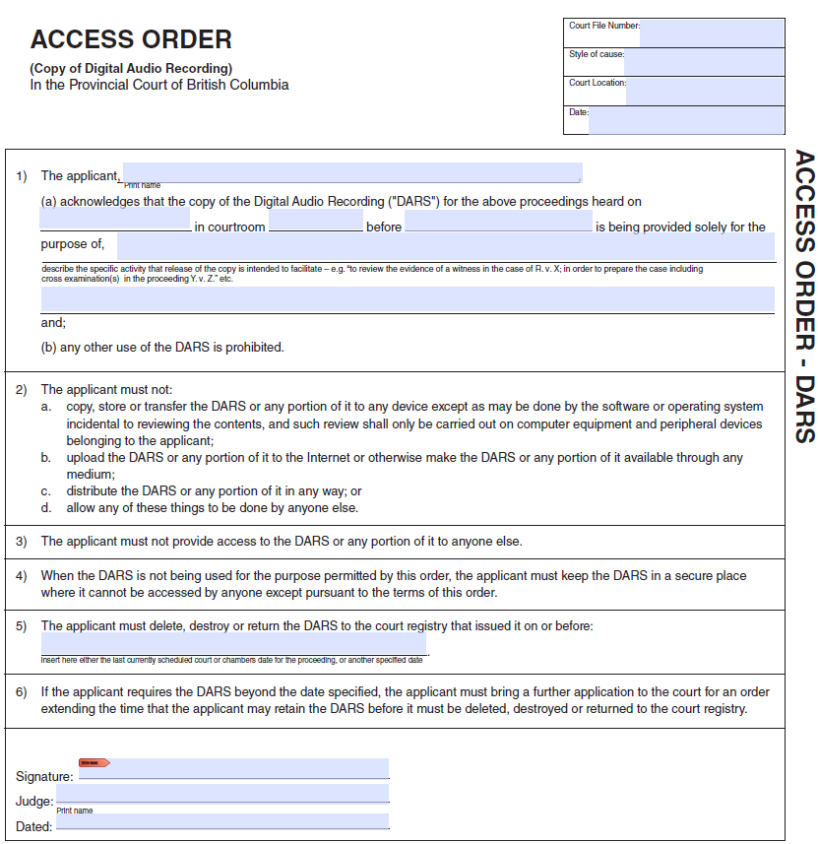
If a court order is required, the judge may allow access to DARS and may include the terms in the Access Order attached as Appendix B. Or the judge may allow an applicant to listen to DARS either at an Audio Listening Station or where operationally feasible in a staffed courtroom at a time set by the registry and may include conditions such as:
- The purpose for which the DARs can be reviewed (for example “to review the evidence of a witness in the case of R. v. X”).
The applicant must not record the audio of the hearing, and must not post, share or disseminate the audio from the hearing.
1) Criminal (Adult) and traffic proceedings (DARS)
1. Accused requesting access
Only if ordered by the presiding judge, or in their absence, the Regional Administrative Judge or Administrative Judicial Justice or their designate.
Order should include the terms in the Access Order attached as Appendix B.
2. Counsel of record requesting access
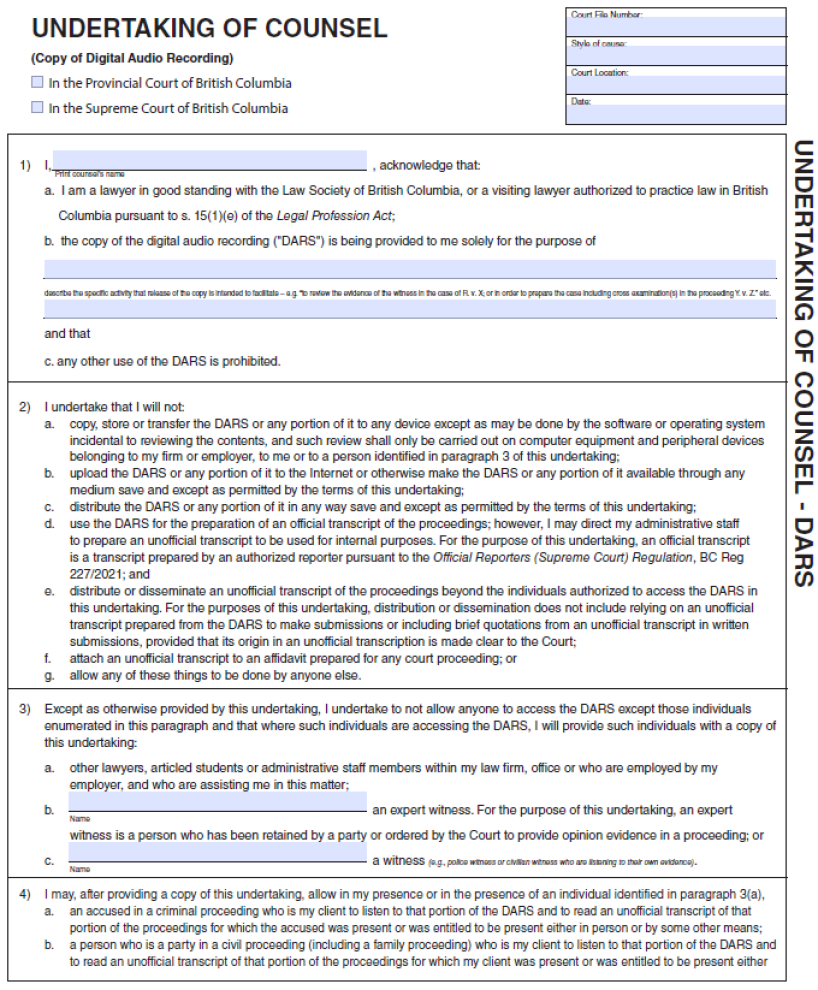
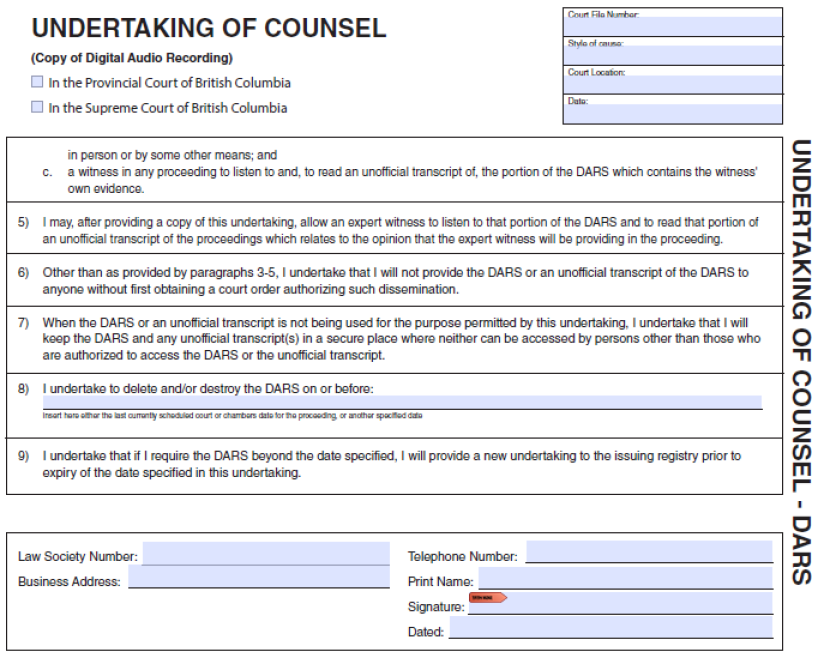
Without an order if they provide an electronic undertaking using their digital credential or an undertaking in the form attached as Appendix A.
3. Other lawyer requesting access
Without an order if the lawyer provides a letter of authorization from the accused or counsel of record authorizing the lawyer to obtain a copy of the audio recording, and an undertaking in the form attached as Appendix A.
4. Accredited media requesting access
If they provide an undertaking and receive a desk order from a Court Services Justice of the Peace. This order includes conditions that:
- Prohibit sharing, broadcasting, transmitting, reproducing (including posting online) the recording
- Require the journalist to keep the copy secure
- Require the journalist to return the copy to the registry or destroy it when it is no longer needed
For more information on access method, see Accredited Media.
5. Any other requesting access
Only if ordered by the presiding judge, or in their absence, the Regional Administrative Judge or Administrative Judicial Justice or their designate.
Order should include the terms in the Access Order attached as Appendix B.
2) Family proceedings (DARS)
1. Parties (or a person authorized in writing by a party or authorized in writing by counsel for a party)
Only if ordered by the presiding judge, or in their absence, the Regional Administrative Judge or their designate.
Order should include the terms in the Access Order attached as Appendix B.
2. Counsel of record
Without an order if they provide an electronic undertaking using their digital credential or an undertaking in the form attached as Appendix A.
3. Lawyer for child
Without an order if they provide an electronic undertaking using their digital credential or an undertaking in the form attached as Appendix A. (Rule 162 Provincial Court Family Rules)
4. Duty counsel (FLA proceedings only)
Without an order if they provide an electronic undertaking using their digital credential or an undertaking in the form attached as Appendix A.
Provincial Court of British Columbia Access Policy 46
5. Other lawyer
Without an order if they provide a letter of authorization from a party or counsel of record authorizing the lawyer to obtain a copy of the audio recording, and an undertaking in the form attached as Appendix A.
6. Any other access
Only if ordered by the presiding judge, or in their absence, the Regional Administrative Judge or their designate.
Order should include the terms
3) Small claims proceedings (DARS)
1. Parties
Only if ordered by the presiding judge, or in their absence, the Regional Administrative Judge or their designate.
Order should include the terms in the Access Order attached as Appendix B.
2. Counsel of record
Without an order if they provide an undertaking in the form attached as Appendix A.
3. Other lawyer
Without an order if they provide a letter of authorization from a party or counsel of record authorizing the lawyer to obtain a copy of the audio recording, and an undertaking in the form attached as Appendix A.
Provincial Court of British Columbia Access Policy 47
4. Accredited media
If they provide an undertaking and receive a desk order from a Court Services Justice of the Peace. This order includes conditions that:
- Prohibit sharing, broadcasting, transmitting, reproducing (including posting online) the recording
- Require the journalist to keep the copy secure
- Require the journalist to return the copy to the registry or destroy it when it is no longer needed
For more information on access method, see “Accredited Media” section.
5. Any other access
Only if ordered by the presiding judge, or in their absence, the Regional Administrative Judge or their designate.
Order should include the terms in the Access Order attached as Appendix B.
***
Notes
(1) For criminal matters “defence counsel” includes duty counsel representing or advising the accused.
(2) Under An Act to amend the Criminal Code, the Youth Criminal Justice Act and other Acts and to make consequential amendments to other Acts (Bill C-75), SC 2019, C. 25, promise to appear was repealed (section 209), and a person bound by a promise to appear was deemed to be bound by an appearance notice (section 354).
(3) Under Rule 174 a “lawyer” includes an articling student acting for a party or an articling student acting as agent for a party’s lawyer.
(4) Director’s counsel can access a file that the counsel was or is counsel on without a court order or authorization.
(5) Judicial case managers schedule trials and hearings. They also preside in some pre-trial court appearances such as initial appearance and assignment courtrooms where they deal with matters before a trial that do not require a judge’s decision.
For the public and law enforcement to obtain the court’s security video (if any) from inside a courtroom, a court order is required(1). These applications will be heard by a judicial officer. These recordings are video only and do not capture sound. For video from courthouse hallways or other courthouse areas outside of a courtroom, contact Court Services Branch.
Introduction: Link to Application Forms
***
Notes
(1) For law enforcement, for time sensitive situations contact BC Sheriff Service.
Page contents
1. Automatic
a. Criminal Code
b. Youth Criminal Justice Act (YCJA)
c. Sex Offender Information Registration Act (SOIRA)
d. Provincial Court Act
e. Intimate Images Protection Act (IIPA)
2. Mandatory on application
3. Discretionary
If someone has the right to access a court record, the existence of a publication ban generally does not prevent access to the court record. A publication ban can prevent anyone from publishing, broadcasting, or transmitting information about a court case.
Courts may, and often must, impose publication bans to protect:
the fairness and integrity of a trial
the privacy and safety of victims or witnesses
the identity of young offenders
other significant public interests
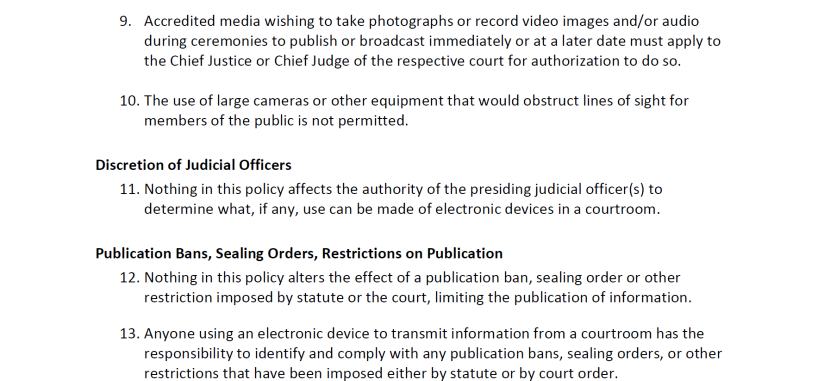
It is the responsibility of the person accessing a court record or observing / listening to a court proceeding to identify and comply with any publication bans. To find out whether a mandatory or discretionary ban has been issued, ask at the court registry where the proceeding is being heard. The terms of the publication ban will indicate the applicable limitations or restrictions. You should also be aware of automatic publication bans.
This area of law is complex. If you are not sure if you can publish something, seek legal advice first. Violating a publication ban can result in serious legal consequences, may be an offence, and may constitute contempt of court.
There are three main types of publication bans:
- Automatic Bans: These are imposed by law and take effect without a court order or a request from any party
- Mandatory Bans Upon Request: Some laws require a judge to impose a ban if a party requests it
- Discretionary Bans: These must be specifically requested and ordered by the court
In some cases there may be a right to apply to revoke or vary a publication ban order.
Examples of each type are provided below. This is not a complete list and does not replace the need for you to review the relevant legal provisions.
1. Automatic
a. Criminal Code
Section 276.03, section 276.07 and section 276.11 make it a criminal offence to publish, broadcast or transmit information from certain applications or hearings in cases involving sexual offences held to determine whether evidence regarding the prior sexual conduct of a complainant can be admitted during the trial. The bans also apply to the decision of the judge on the application unless the judge determines the decision can be published. There are some exceptions, including that the complainant or witness may disclose some information in certain circumstances.
Section 278.18, section 278.27, section 278.32 and section 278.36 make it a criminal offence to publish, broadcast or transmit information from certain applications or hearings to obtain or determine whether to admit into evidence records or therapeutic records pertaining to a complainant or a witness. The bans also apply to the decision of the judge on the application unless the judge determines the decision can be published. There are some exceptions, including that the complainant or witness may disclose some information in certain circumstances.
Section 542(2) makes it a criminal offence to publish, broadcast or transmit an admission or confession that was given in evidence at a preliminary inquiry, unless the accused has been discharged or if the accused is ordered to stand trial, the trial has ended.
Section 672.51(11) bans the publication of any disposition information provided to the Court during the disposition hearing held after a verdict of not criminally responsible on account of mental disorder or unfit to stand trial is given, where the information has been withheld from the accused or disclosure would be seriously prejudicial to the accused.
b. Youth Criminal Justice Act (YCJA)
Section 110 provides that no person shall publish the name of, or information related to, a person if it would identify that the person was a young person dealt with under the YCJA. However, there are some exceptions. Publication is permitted, for example, when a person has received an adult sentence.
Section 111(1) provides that no person shall publish the name of someone under the age of 18 who has been a witness or victim in connection with an offence committed or alleged to have been committed by a young person.
c. Sex Offender Information Registration Act (SOIRA)
Section 16(4) provides that, with limited exceptions, no person shall disclose any information that is collected pursuant to an order under SOIRA or the fact that information relating to a person is collected under SOIRA.
d. Provincial Court Act
Section 3(6) prohibits publication of anything that would reasonably be likely to identify a child or party in relation to a family or children’s matter before the Provincial Court.
e. Intimate Images Protection Act (IIPA)
Section 13 provides that in an application under section 5 or a claim under section 6 of the IIPA, the decision maker must order a ban on publication of the name of the applicant or claimant, and the respondent in certain circumstances, set out in the IIPA and the Intimate Images Protection Regulation.
2. Mandatory on application
There are statutory bans that a judge must order if requested by a specified party. Common mandatory bans are those involving bail hearings (section 517) and preliminary inquiry hearings (section 539) under the Criminal Code.
Section 517 provides that on application by the accused, an order shall be made to ban publication, broadcast or transmission of the evidence, information given or representations made to the court during a bail hearing as well as the reasons given by the judge until the accused is discharged or, if ordered to stand trial, the trial has ended.
Section 539 provides that on application by the accused, prior to commencing the taking of evidence, a judge shall order a ban that provides that evidence given at a preliminary inquiry not be published, broadcast or transmitted until the accused has been discharged or, if ordered to stand trial, the trial has ended.
3. Discretionary
Judges considering an application for a discretionary ban must consider whether to issue a ban by applying common law tests such as those set out under:
- Dagenais v. CBC [1994] 3 S.C.R. 835
- R. v. Mentuck, 2001 SCC 76
- Sierra Club of Canada v. Canada, 2002 SCC 41
- Sherman Estate v. Donovan, 2021 SCC 25
Courts have the power under common law to manage their own proceedings. This includes the ability to ban publication of all or part of a case to, for example, ensure a fair trial.
Discretionary bans can also arise under legislation. For example, under the Criminal Code discretionary bans include:
Section 486(1) provides that an order may be made to exclude the public from the courtroom for all or part of the proceeding.
Section 486.4(1) provides that an order may be made in cases involving sexual offences to ban publication, broadcast or transmission of any information that could identify a victim or witness.
Section 486.5(1) provides that an order may be made in non-sexual offence cases prohibiting any information that could identify a victim or a witness from being published, broadcast or transmitted.
Section 517 provides that on application by the prosecutor, an order may be made to ban publication, broadcast or transmission of the evidence, information given or representations made to the court during a bail hearing as well as the reasons given by the judge until the accused is discharged or, if ordered to stand trial, the trial has ended.
Section 539 provides that on application by the prosecutor, prior to commencing the taking of evidence, a judge may order a ban that provides that evidence given at a preliminary inquiry not be published, broadcast or transmitted until the accused has been discharged or, if ordered to stand trial, the trial has ended.


Court of Appeal’s Record and Courtroom Access Policy
Supreme Court’s Policy on Access to the Court Record
Supreme Court’s PD 48 - Video Recording or Broadcasting of Court Proceedings
Provincial Court’s Access Policy
For more information about this policy please contact:
Superior Courts Communications: SCJ.Communications@bccourts.ca
Provincial Court Legal Counsel: Media
Approved by: Governance Committee
May 5, 2026: The following policies were combined into this single policy and updated: ACC-0 Access Policies, ACC-1 Access to Court Proceedings, ACC-2 Access to Court Records, MED-1 Media Accreditation Policy, NM 01 Accredited Media Access to Court Proceedings and Court Records, BAN-1 Bans on Publication, Use of Electronic Devices in Courtrooms, Notice 10 Recording of Proceedings Before Judicial Case Managers, Notice 21 Remote Attendance in the Provincial Court, and FAM 02 Searching a Registry File Rule 174 Provincial Court Family Rules. These policies were retired when this policy took effect.
The Use of Electronic Devices in Courtrooms remains in effect and is in Appendix C of this policy.
- June 24, 2026: Court record section had a table listing criminal documents and access information. Due to formatting issues when exported as a PDF, policy revised so that each document type is now listed, with access information beneath.
- August 6, 2026: The Court records access section was updated to include an example under “Purpose”. The Court proceedings access section was updated to add information about how to ask for approval to sketch in a courtroom. The Publication ban section, subsection 1 (automatic bans) has been updated to reflect changes to the Criminal Code made in Bill C-16, Protecting Victims Act.
- August 19, 2026: Court records access section, section 1.b., subsection 19 updated to reflect recent changes in the Criminal Code.