
We’re responding to website feedback!

In January 2026 we asked users of our website to take a short survey to help us improve the site after its first year in operation. We’re grateful to everyone who took the time to give us feedback and the Court’s website team is acting on many of your comments.
Here we explain some of the changes we’re making and offer tips to help with things we can’t change.
Overall assessment
We were pleased to get positive feedback like “informative and easy to use”, “well organized”, “videos and more photos are helpful”. There were also favourable comments on the ability to download and save web pages as pdfs, the quick exit button in the top right corner, and how eNews articles about judges and other judicial officers help to personalize the court process.
There were 51 survey responses. Assessing how easy it was to find what they were looking for, most people (65%) said it was very easy, easy or average.
For those who found it difficult, we have some tips to make it easier. About half of you were looking for information about a different court or matters that don’t come before our court, asking to add information that is already on the website (we’ll tell you where to find it), or you didn’t explain why you found it difficult.
Navigating the homepage
Some people are having trouble adjusting to our new, longer homepage. Things that used to be at the top of the homepage have moved down. We made this change to adopt a more modern design, but we understand it may take time to adjust.
Please take a close look at the homepage. On a desktop computer, hover over the topics across the top to see drop-down menus of what they offer. On a phone or tablet, click the three short lines in the top left corner to show those topics and menus.
Scroll down to find news Updates from the Court and the latest eNews articles.
Then check out the quick links at the bottom of the homepage. They’re listed under “More Information” and under “Resources”. Some of these quick links give you speedy access to:
- Notices, policies and practice directions
- Court Services Online (CSO), the electronic platform that gives access to some court record information and allows e-filing of some documents
- Daily court lists for small claims and criminal matters
- Court forms
- Picklists, the numbered lists containing standard wording for common court orders
On a desktop computer:
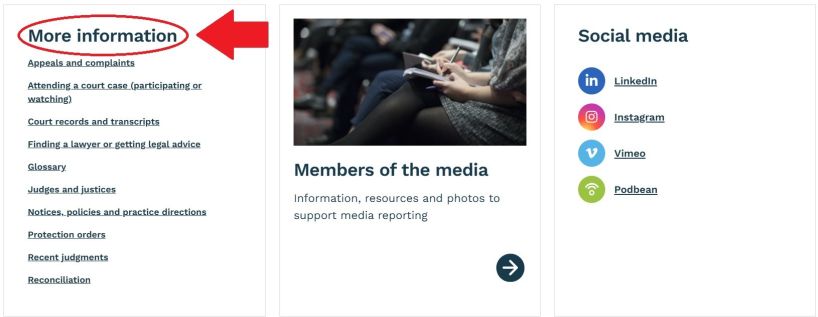
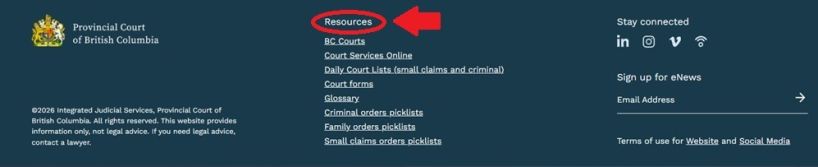
On a phone or tablet:
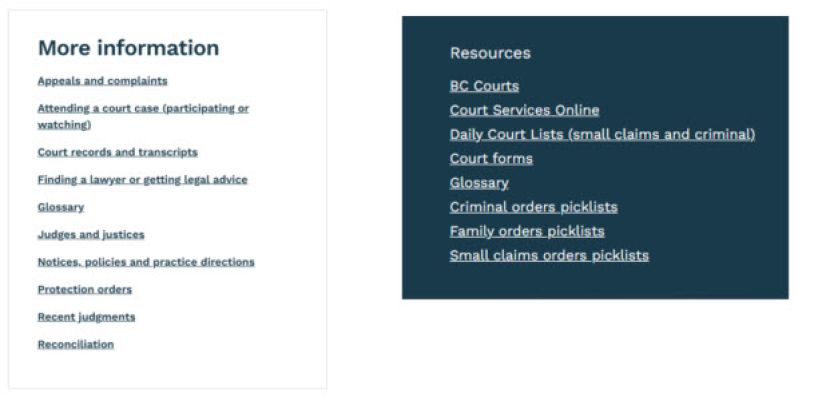
The Resources box also appears at the bottom of every page.
Reaching a “Page not found” message
When we launched the new website last year, our page URLs changed. Links you bookmarked on the old site no longer work. We provided a list of new URLs for some of our most popular pages so you could update bookmarks. But we have now added automatic redirects for the pages that produce the most “Page not found” messages. We hope this helps you get to the information you need more quickly and easily.
Provincial Court Redirect List
The new site does not contain all the information from the old site, or it may provide the information in another place, so please use the “Search” function in the top right corner if you still get a “Page not found” message.
Finding information
Some people found our previous website easier to navigate. We sympathise. It can be hard to adjust to something new, especially if you used our old website frequently. When we were designing our new site, user-testing told us the old website was challenging for people without legal knowledge to navigate. The new design was intended to work better for litigants and others without extensive legal knowledge.
People also mentioned specific information they had trouble finding. Here’s where to find those things.
Information | Where to find it |
| Notices, policies and practice directions | There’s a quick link to the Notices, policies and practice directions page in the “More information” box near the bottom of the homepage. We’re working on reorganising the page to make it more user-friendly. Stay tuned for improvements! Follow the Court on social media (currently LinkedIn and Instagram) to find out when notices, policies and practice directions are updated.
|
| Forms, especially Provincial Court Family forms | Image
There’s a quick link to the government Court forms web page in the “Resources” box at the bottom of every page. There are also links to forms in coloured boxes on the right side of the “Getting ready” pages for family, small claims, criminal and traffic cases.
|
| Daily court lists | They’re on the Court Services Online (CSO) website. There’s also a quick link to them in the “Resources” box at the bottom of every page.
|
Circuit courts
| There’s a “Circuit courts” webpage with links to the “Court locations” pages that provide sitting dates for circuit courts. In addition to circuit courts visited periodically by a judge and court team who hold court in two or more remote locations in a week, there are “unstaffed court locations” where judges and court staff attend when court is held. Both circuit and unstaffed courts are listed alphabetically on the “Court locations” pages. See too eNews articles describing judges’ circuit court trips: Bringing the Court north of the 59th parallel Bringing the Court to BC’s west coast islands A circuit court judge reports on his travels
|
| Small claims cases | Our previous website had a detailed guide to preparing for small claims court. When planning our new website, we decided that other websites provide and update that information more simply and clearly. Our “Small claims” pages therefore include links to websites like SmallClaimsBC.ca, BC government how-to-guides, and People’s Law School.
|
| Divorce and adoption | The Provincial Court doesn’t deal with divorce, division of family property after separation, or adoption. We have added text explaining that only the BC Supreme Court deals with those issues and included a link to that court’s website.
|
| “Secure login” | A comment about needing a secure login to track cases didn’t relate to our website. It may have referred to Court Services Online, operated by the BC Government. |
| “Profile page” | A comment about returning to a profile page seemed as if it might apply to online applications for judicial appointments and they will be examined.
|
Suggestions
Here’s how we’re responding to the requests and suggestions we received.
- “More specific and timely information about sitting dates in circuit and satellite court locations.”
We are adding more specific information where we can, for example, “the second Tuesday of the month” instead of “some Tuesdays” and standardizing how this information is shown as much as possible. Dates are posted as soon as they are scheduled. Scheduling is occasionally delayed due to circumstances beyond our control.
- “Make it easier to copy and paste a court name, address and phone number with one swipe.”
We have reduced the work needed to copy court details by moving courthouse names to the same text box as the address. Due to the website design, it’s more complicated to move phone numbers so we have not moved them at this time.
- “Please add court registry email addresses.”
Our website provides physical addresses for court locations and court registries. For email addresses we provide links to the BC government website with that information. Because the government updates those email addresses, this ensures email addresses are kept current.
- “I’d like to see more judgments on your website and a longer list of recent judgments.”
Our website shows 20 of the most recent judgments posted online. To see others, visit CanLII and select BC and Provincial Court as filters.
- “More photos are helpful.”
We’ve added more photos to our “Reconciliation” page. We’ll keep looking for other places to add photos.
Don’t wait for a survey
The responses to our survey are helping us improve the Court’s website, but you don’t need to wait for another survey. If you have feedback on the website, please let us know using our social media accounts on LinkedIn and Instagram.
This page was printed from:
https://provincialcourt.bc.ca/news-notices-policies-and-practice-directions/enews/09-06-2026